前提
服务器:3x.1xx.2xx.1xx
密码:我不告诉你
CentOS Linux release 7.8.2003 (Core)
gitlab-ce-13.1.4-ce.0.el7.x86_64
主要配置文件
默认配置文件路径:/etc/gitlab
/etc/gitlab/gitlab.rb:主配置文件,包含外部URL、仓库目录、备份目录等
/etc/gitlab/gitlab-secrets.json:(执行gitlab-ctl reconfigure命令行后生成),包含各类密钥的加密信息
设置备份
# cat /etc/gitlab/gitlab.rb |grep -v "#" |grep -Ev '^$'gitlab_rails['backup_path'] = "/backups" #备份的目录gitlab_rails['backup_archive_permissions'] = 0644 #备份包(tar格式压缩包)的权限gitlab_rails['backup_keep_time'] = 604800 #备份的保留时间,单位是秒 7天【随便搞个吧 反正是全量备份】# gitlab-ctl reconfigure #重载配置,使之生效挂载nas
无脑抄就妥了
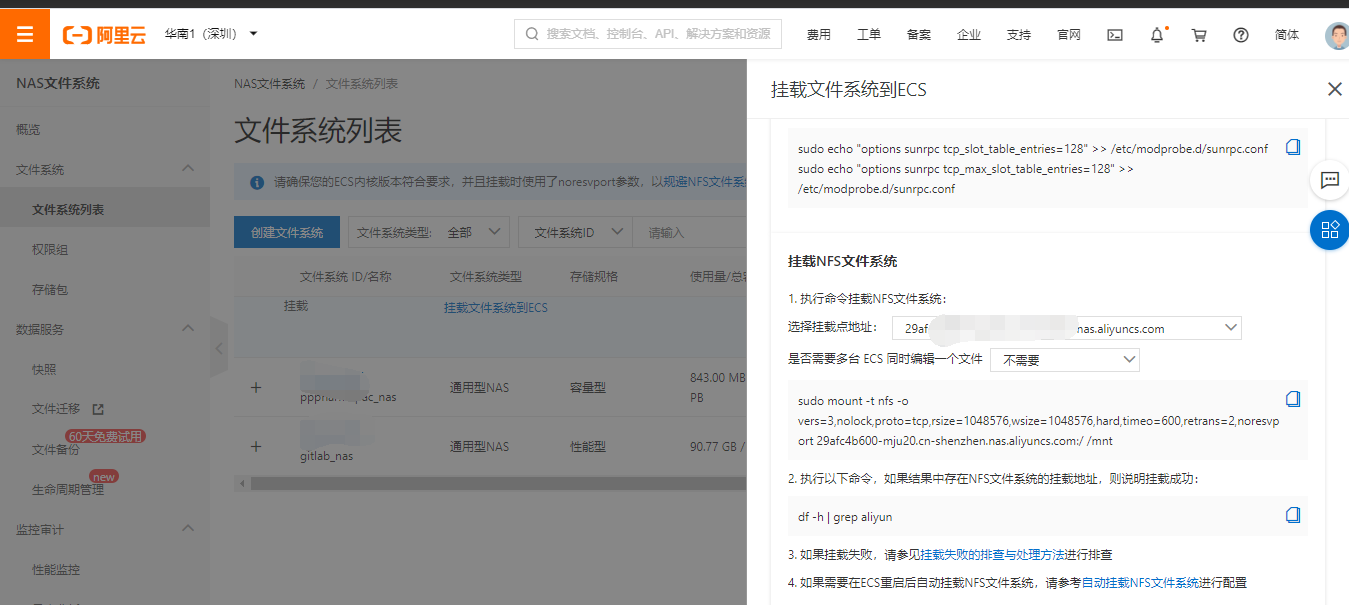
# sudo echo "options sunrpc tcp_slot_table_entries=128" >> /etc/modprobe.d/sunrpc.conf# sudo echo "options sunrpc tcp_max_slot_table_entries=128" >> /etc/modprobe.d/sunrpc.conf# mount -t nfs -o vers=3,nolock,proto=tcp,rsize=1048576,wsize=1048576,hard,timeo=600,retrans=2,noresvport 29afc4b600-mju20.cn-shenzhen.nas.aliyuncs.com:/ /backups# df -h | grep aliyun29afxxx-mjxxx-shenzhen.nas.aliyuncs.com:/ 10P 3.0M 10P 1% /backups# cd /backups/ && ll执行备份指令
# gitlab-rake gitlab:backup:create# lltotal 569582-rw-r--r-- 1 git git 583249920 Aug 15 14:33 1597473194_2020_08_15_13.1.4_gitlab_backup.tar# df -h | grep aliyun29afc4b600-mju20.cn-shenzhen.nas.aliyuncs.com:/ 10P 560M 10P 1% /backups测试
[root@gitlab backups]# lltotal 569582-rw-r--r-- 1 git git 583249920 Aug 15 14:57 1597474617_2020_08_15_13.1.4_gitlab_backup.tar[root@gitlab backups]# cd ..[root@gitlab /]# umount /backups[root@gitlab /]# cd /backups/[root@gitlab backups]# lltotal 0[root@gitlab backups]# cd ..[root@gitlab /]# mount -t nfs -o vers=3,nolock,proto=tcp,rsize=1048576,wsize=1048576,hard,timeo=600,retrans=2,noresvport 29axxxxxxxx0.cn-shenzhen.nas.aliyuncs.com:/ /backups[root@gitlab /]# cd /backups/[root@gitlab backups]# lltotal 569582-rw-r--r-- 1 git git 583249920 Aug 15 14:57 1597474617_2020_08_15_13.1.4_gitlab_backup.tar定时备份
# crontab -l# backup gitlab to nas 29afc4b6000 2 * * * /usr/bin/gitlab-rake gitlab:backup:create[root@gitlab backups]# systemctl restart crond.service 还原数据
特别注意:
- 备份目录和gitlab.rb中定义的备份目录必须一致
- GitLab的版本和备份文件中的版本必须一致,否则还原时会报错。
# cat /etc/gitlab/gitlab.rb |grep "backup_path" |grep -Ev "^$" # 确认备份目录gitlab_rails['backup_path'] = "/backups"# ll /backups/ # 确认备份文件total 569582-rw-r--r-- 1 git git 583249920 Aug 15 14:57 1597474617_2020_08_15_13.1.4_gitlab_backup.tar# gitlab-rake gitlab:backup:restore BACKUP=1597474617_2020_08_15_13.1.4 # 还原Unpacking backup ... doneBefore restoring the database, we will remove all existingtables to avoid future upgrade problems. Be aware that if you havecustom tables in the GitLab database these tables and all data will beremoved.Do you want to continue (yes/no)? yesRemoving all tables. Press `Ctrl-C` within 5 seconds to abortYou will lose any data stored in the authorized_keys file.Do you want to continue (yes/no)? yesWarning: Your gitlab.rb and gitlab-secrets.json files contain sensitive data and are not included in this backup. You will need to restore these files manually.Restore task is done.# gitlab-ctl restart # 重启服务ok: run: alertmanager: (pid 26150) 1sok: run: gitaly: (pid 26163) 0sok: run: gitlab-exporter: (pid 26182) 1sok: run: gitlab-workhorse: (pid 26184) 0sok: run: grafana: (pid 26204) 1sok: run: logrotate: (pid 26216) 0sok: run: nginx: (pid 26223) 1sok: run: node-exporter: (pid 26229) 0sok: run: postgres-exporter: (pid 26235) 0sok: run: postgresql: (pid 26321) 1sok: run: prometheus: (pid 26330) 0sok: run: redis: (pid 26341) 1sok: run: redis-exporter: (pid 26345) 0sok: run: sidekiq: (pid 26353) 0sok: run: unicorn: (pid 26364) 0s# gitlab-rake gitlab:check SANITZE=true # 检查GitLab所有组件是否运行正常
没有评论:
发表评论